
Wordle. Connections. Worldle. Framed. Contexto.
If you play several daily games, you probably know the routine: open each website, complete today’s puzzle, and move on to the next. But as your collection grows, remembering which ones you have already played can become surprisingly difficult.
Some games track winning streaks. Others provide limited statistics, and some do not offer a streak counter at all. Fortunately, you do not need a complicated system to organize them.
Here is how to track your daily dles, manage multiple game streaks, and build a checklist that works for you.
1. Make a list of your daily dles
The first step is simply to put all your daily games in one place. A daily puzzle list might look like this:
- Wordle — complete
- Connections — complete
- Worldle — complete
- Framed — not completed
- Contexto — not completed
Instead of trying to remember which websites you visited, check each game off as you complete it. This works particularly well across different websites because there is no universal system that automatically tracks every daily puzzle.
You can begin with a notes app, a spreadsheet, or even paper. The important part is having one reliable place to see what remains.
If you are still building your list, start with our guide to dles and popular daily games.
2. Decide what your streak measures
Before tracking a streak, decide whether you are measuring how many days you played or how many days you won. Those represent two different goals.
Winning streaks
A winning streak counts consecutive successful results. If you solve Wordle correctly for 12 days in a row, that is a 12-day winning streak. Losing a puzzle breaks that streak even if you played.
Some games already maintain their own winning counters, so you may not need to duplicate them elsewhere.
Participation streaks
A participation streak measures how consistently you show up. If you play Connections every day for 30 days, you have a 30-day participation streak regardless of whether you solved every puzzle.
Neither approach is inherently better. A winning streak may matter more if you are competitive; participation can be more rewarding if your goal is simply to enjoy a daily puzzle routine.
3. Choose how to track your games
The best method depends on how much information you want to record and how much maintenance you are willing to do.
Option A: A simple notes checklist
Create a checklist in your preferred notes app, reset it each day, and mark games as completed.
Best for: Players who only need to remember what they played today.
Limitation: Tracking consecutive days or personal records requires additional manual work.
Option B: A spreadsheet
A spreadsheet can place games in rows and dates in columns, creating a basic activity history:
| Game | Mon | Tue | Wed | Thu |
|---|---|---|---|---|
| Wordle | ✓ | ✓ | ✓ | ✓ |
| Connections | ✓ | ✓ | ✓ | ✓ |
| Worldle | ✓ | ✓ | ✓ | — |
| Framed | ✓ | — | ✓ | — |
You can add formulas for streak lengths or completion rates.
Best for: Players who enjoy detailed records and statistics.
Limitation: Maintaining the spreadsheet can take more effort than some puzzles.
Option C: A dedicated streak tracker
If you want a checklist and streak tracking together, a dedicated app can reduce the setup.
Streak Companion is an iPhone app for recurring activities across different games and apps. It lets you:
- Add daily games using presets or custom streaks.
- Check off completed games in one daily checklist.
- Optionally track a current count and personal best.
- Set a local daily reminder.
- Use Home Screen and Lock Screen widgets with Pro.
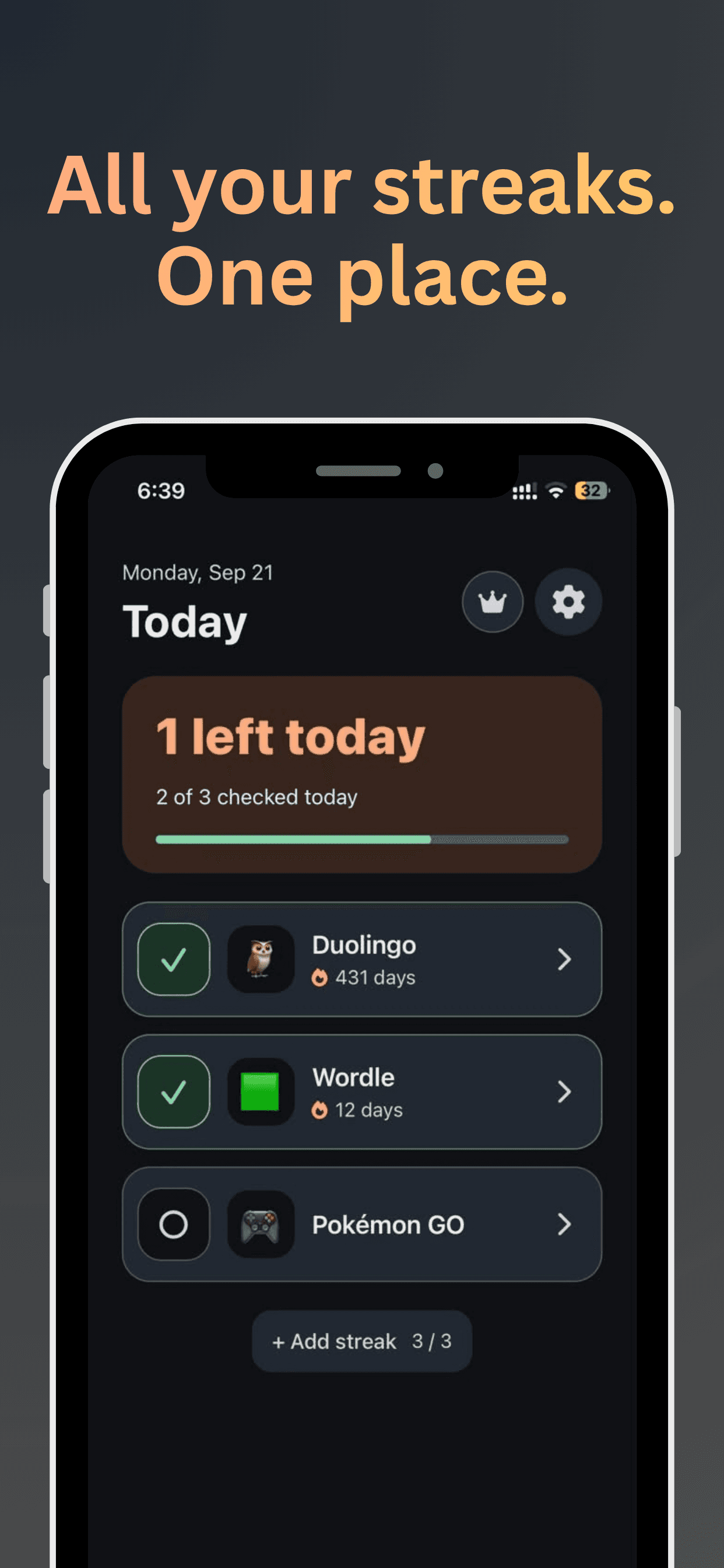
Streak Companion uses manual check-ins. It does not connect to Wordle, Connections, or other games to verify results, so you decide whether completion means playing, winning, or simply showing up.
The free version supports up to three streaks. A one-time Pro purchase unlocks additional streaks and the Home and Lock Screen widgets.
4. Create a daily puzzle routine
Once you have a tracking method, a few small decisions can make the routine easier:
- Keep the list manageable. Choose games you genuinely enjoy instead of trying to play every daily game available.
- Use a familiar time. Breakfast, a commute break, or the end of the day can provide a consistent cue.
- Use reminders only when helpful. A notification can prevent forgotten puzzles, but it should not turn play into an obligation.
- Do not demand perfection. Missing a day does not erase the enjoyment or progress that came before it.
For more context on motivation and flexibility, read why daily games and streaks keep people coming back.
5. What if your streaks span different apps?
Daily puzzles are only one kind of recurring activity. You might also maintain streaks in language-learning apps, chess puzzles, games, fitness routines, or personal projects.
The same framework works across all of them: create a list, define what completion means, and check each activity off consistently. A centralized checklist is particularly useful when every activity lives somewhere different.
Final thoughts
Tracking daily dles does not need to be complicated. A notes checklist may be enough for a few games, while a spreadsheet offers greater historical detail.
If you prefer a dedicated checklist with optional counts, reminders, and widgets, Streak Companion provides one place for games and other recurring activities.
The best tracking system is the one that takes the least effort away from the games you enjoy. Explore Streak Companion or download it on the App Store.
Streak Companion is independent and is not affiliated with or endorsed by the third-party games, publishers, or services mentioned in this article.